
ZoikoTime Mobile App
Workforce assurance, wherever approved work happens
The ZoikoTime Mobile App gives Workers, Managers, and authorized teams a clear mobile experience for time records, Worker Status, breaks, Early Finish Requests, approvals, exceptions, and audit-ready activity.
No screenshots, keystroke content, personal browsing data, private messages, or personal device monitoring — just governed workforce records.
Rollout Status
Mobile app rollout status
The ZoikoTime Mobile App is being prepared for controlled rollout. Public App Store and Google Play links will be added once the iOS and Android listings are approved and available.
Current status
Controlled rollout preparation
App-store links
Coming after approval
Enterprise pilot
Available by approval
Customer access
Requires tenant workspace
Worker access
Requires invitation or login
Coming to
App Store
Coming soon
Coming to
Google Play
Coming soon
Who It's For
Who the app is for
Workers
Workers
Start work, view current Worker Status, take eligible breaks, submit Early Finish Requests, respond to Unverified Exit prompts, and review a personal timeline.
Managers
Managers
Review team status, approve requests, manage exceptions, respond to break overruns, review Unverified Exit events, and apply Authorized Stand- Down.
Admins
Administrators
Extend workforce governance to mobile while preserving policy controls, role-based access, session security, audit evidence, and tenant-level nvisibility.
Enterprise
Enterprise teams
Support HR, operations, compliance, finance, IT, and leadership with mobile-ready workforce visibility that respects privacy and strengthens governance.
Workers
What workers can do
A clear, transparent mobile experience — with an explanation for every action that isn't available.
Start shift
See assigned shift, time zone, current status, and policy note before recording shift start.
View Worker Status
Clear labels: Working, Short Break, Lunch Break, Idle Review, Early Finish Pending, Authorized Stand-Down, Unverified Exit, Shift Ended.
Take eligible breaks
Short Break and Lunch Break based on policy. Unavailable breaks show a disabled state with explanation — never hidden.
Request Early Finish
Before the clock-out window, submit an Early Finish Request with reason and return intent — not a silent exit.
Explain Unverified Exit
Asked for context on next login in neutral language. Never labeled a violation before manager review.
Review timeline
See their own shift start, breaks, requests, approvals, exceptions, and corrections.
Managers
What managers can do
Scoped, policy-aware review tools — with audit-logged decisions.
See team status
Managers see only Workers within their authorized team scope.
Review break overruns
Receive and review break overrun events based on tenant policy.
Approve Early Finish Requests
Approve, reject, convert to leave, convert to absence, or escalate depending on configuration.
Apply Authorized Stand-Down
Pause work for Workers, teams, departments, or locations during legitimate operational interruptions.
Review Unverified Exit
Review Worker explanations before classification — the system never labels an event a violation before review.
Preserve audit trail
Decisions are audit-logged with actor, timestamp, policy version, decision, and reason where required.
Privacy Boundary
A clear mobile privacy boundary
ZoikoTime records governed workforce activity — and deliberately never captures personal device content.
ZoikoTime records
- Worker Status
- Time events
- Break events
- Shift events
- Manager approvals
- Authorized Stand-Down
- Unverified Exit explanations
- Policy versions & audit records
ZoikoTime never captures
- Screenshots
- Keystroke content
- Private messages
- Personal browsing history
- Application names
- Clipboard content
- Private files, photos, calls, contacts
- Microphone or screen recording
Permissions
Mobile permissions and device boundaries
Every permission has a stated purpose — and an explicit list of what the app does not access.
Push notifications
May be used for reminders, approvals, exception review, and important workforce status updates.
Location context
Only if the tenant enables location-context rules, the Worker has been notified, and device permissions are granted — never hidden tracking.
Camera access
Only requested if an approved workflow requires QR capture, document capture, or another verified use case.
Biometric unlock
May be used as device-level convenience where supported. Not workforce monitoring.
Explicit non-access
No contacts, SMS, call logs, personal emails or photos, private files, microphone, screen recording, clipboard, other-app activity, or browser history.
Worker transparency
Permission prompts explain why a permission is requested, what it's used for, and what it is not used for.
Connectivity
Offline and low-connectivity behavior
Field and distributed work needs reliable behavior when connection drops — handled safely and fairly.
- Offline — 2 actions pending sync · last synced 09:31
- Connectivity state is always shown clearly on screen.
- Eligible actions are preserved where technically safe, with original timestamp retained.
- Pending actions sync when connection returns, with a separate sync timestamp and idempotency to prevent duplicates.
- Unresolved continuity issues are marked Unverified Exit — Pending Review, never as a violation.
Device Readiness
BYOD and managed device readiness
Clear boundaries so ZoikoTime is never blamed for a customer's device - management behavior.
Bring-your-own-device (BYOD)
ZoikoTime records workforce actions inside the ZoikoTime app. It does not monitor the Worker's personal device outside the app.
Company-managed devices
Broader device controls are handled by the customer's own MDM policies and tools — separate from ZoikoTime and governed by the customer's notices, policies, and legal obligations.
Access
Access pathways
Downloading the app alone does not create access — access requires an authorized workspace, invitation, or approved login.
Worker
Invited by employer
The Worker receives access from the organization, signs in, and uses the app based on tenant policy and role permissions.
Existing workspace
Invited by employer
Managers and Admins sign in with approved workspace credentials and see only permitted teams, records, and settings.
Enterprise
By approval
Pilot access
Organizations evaluating mobile can request controlled pilot access before wider rollout.
Screens
App screens preview
Real ZoikoTime states — not generic phone screens.
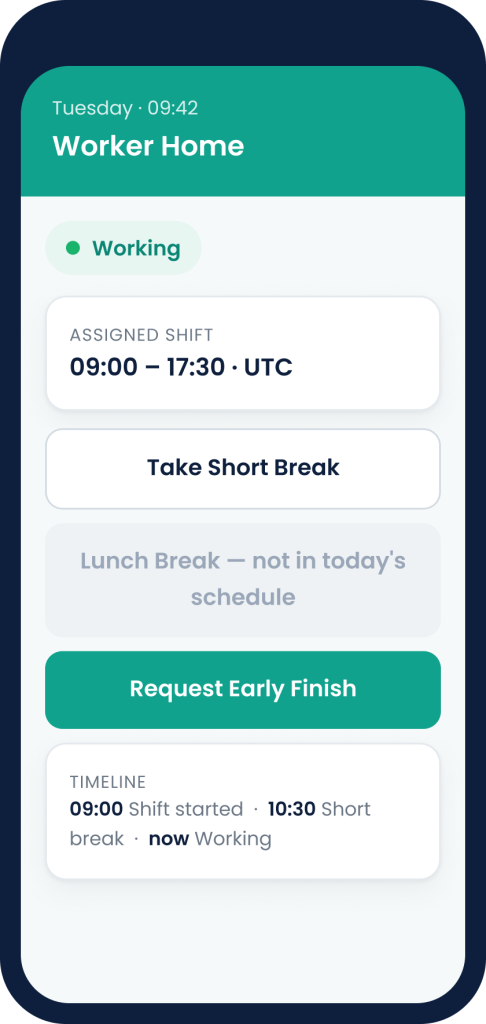
Worker Home
Current status, assigned shift, Start / End Shift, break actions, Early Finish Request, policy note, timeline preview.
Break Timer
Break type, time remaining, grace period, Return to Working, reminder state, and overrun state.
Early Finish Request
Reason, return intent, expected return time, supporting note, and Submit for Review.
Worker Timeline
Shift start, working periods, breaks, requests, manager decisions, and corrections.
Manager Team View
Active Workers, on break, needs review, team exceptions, and Authorized Stand-Down action.
Unverified Exit Review
Last confirmed status, connection-loss time, Worker explanation, and manager decision options.
Permission Prompt
Why a permission is requested, what it's used for, and what it is not used for.
Offline Sync State
Offline banner, pending actions, sync state, and last- synced timestamp.
Enterprise Controls
Enterprise mobile controls
Mobile extends governance — it never becomes covert monitoring.
Role-based access
Mobile visibility depends on role, permission, team scope, tenant scope, and policy configuration.
Tenant isolation
Mobile sessions enforce tenant isolation at API, data, dashboard, notification, report, and export layers.
Region awareness
Mobile data follows the tenant's configured data region and residency commitments.
Secure authentication
Secure login, session control, MFA for administrative roles, and SSO where available.
Session governance
Mobile sessions are identifiable, revocable, and audit-logged.
Policy-controlled actions
Clock-in, breaks, clock-out, Early Finish, and manager actions follow tenant policy.
Audit trail
Critical mobile actions create audit records available to authorized reviewers.
No hidden monitoring
The app never operates as a covert monitoring tool.
Notifications
Role-aware notifications
Notifications are role-aware, tenant-scoped, policy-driven, actionable, never excessive, and never disciplinary in language.
Worker
Worker notifications
Shift & break reminders, break overrun, Early Finish confirmation and decision, Unverified Exit context request, Authorized Stand-Down notice, Return to Working.
Manager
Manager notifications
Early Finish Request submitted, break overrun, Unverified Exit awaiting review, Worker explanation submitted, Stand-Down confirmation, team exception summary.
Admin
Admin notifications
High-risk mobile policy change, mobile export where allowed, unusual exception pattern, tenant access issue, security or session event.
Accessibility
Accessibility and mobile usability
Designed to be clear and usable for everyone.
Plain-language messages
Clear text labels and plain-language messages throughout.
Screen-reader friendly
Screen-reader-friendly labels across the experience.
Explained blocked actions
A worker-facing explanation for every blocked or unavailable action.
High-contrast, touch-friendly
High-contrast text and touch targets sized for mobile use.
Questions
Mobile App FAQs
What is the ZoikoTime Mobile App?
Can Workers download the app now?
Does downloading the app create ZoikoTime access?
Can Workers clock in and out from the app?
Can Workers take breaks from the app?
Can Managers approve requests from the app?
Does the app capture screenshots?
Does the app track private phone activity?
Does the app use location?
What happens if the Worker loses connection?
Mobile Workforce Assurance
Bring workforce assurance to every approved work environment
Give Workers a clear mobile experience for managing their status, and give Managers the tools to review mobile activity, exceptions, approvals, and audit-ready records with confidence.